Free · Data Engineering · DuckDB
From ETL to OLAP: Rio's Bus Ticketing Data with DuckDB
A bootcamp session on moving 71 million transactions from BigQuery to Cloud Storage and querying them with DuckDB.
From ETL to OLAP
I presented at the FTL Brasil SpaceTech Bootcamp 2026 and prepared a hands-on session for the students. The path was simple to say and fun to run: get the data out of BigQuery, park it in Google Cloud Storage, and query it with DuckDB.
The dataset is the ticketing data of public transport in Rio de Janeiro. April 2026. About 71 million records. Each row is one validation, which is a person tapping a card on a bus.
Everything is in the repository.
The plan
Three pieces, one direction. BigQuery holds the raw table. Cloud Storage holds Parquet files. DuckDB asks the questions.
Two terms before we go on. ETL means extract, transform, load: take raw data, clean it, store it somewhere useful. OLAP means analytical queries: scan millions of rows, aggregate a few columns, return a small table. If you already know both, skip to the next section.
The storage follows the medallion pattern. Here I call them raw, silver and gold.
| Layer | What lives there | Path |
|---|---|---|
| Raw | Original transactions | gs://dados_bilhetagem/transacoes/transacoes_abril_*.parquet |
| Silver | Clean, filtered to Rio, indexed with H3 | gs://dados_bilhetagem/medallion/silver/transacoes_abril/ |
| Gold | Silver plus the neighborhood name | gs://dados_bilhetagem/medallion/gold/transacoes_abril/ |
1. From BigQuery to Cloud Storage
The raw data starts in BigQuery. The first move is to export it to the bucket as Parquet. Here is the BigQuery link to the data source.
Parquet is a columnar file format. It stores each column together, so a query that needs three columns reads three columns and ignores the rest. This matters in the OLAP step.
EXPORT DATA OPTIONS(
  uri='gs://dados_bilhetagem/transacoes/transacoes_abril_2026_*.parquet',
  format='PARQUET',
  overwrite=true
) AS
SELECT
  data, hora, id_transacao, datetime_transacao, datetime_processamento,
  datetime_captura, modo, id_consorcio, consorcio, id_operadora, id_operadora_jae,
  operadora, tipo_documento_operadora, id_servico_jae, servico_jae, descricao_servico_jae,
  sentido, id_veiculo, id_validador, tipo_documento_cliente, cadastro_cliente, produto,
  produto_jae, tipo_transacao, tipo_transacao_jae, tipo_usuario, meio_pagamento,
  meio_pagamento_jae, latitude, longitude, geo_point_transacao, valor_transacao, valor_pagamento,
  data_ordem, id_ordem_pagamento_servico_operador_dia, id_ordem_pagamento_consorcio_operador_dia,
  id_ordem_pagamento_consorcio_dia, id_ordem_pagamento, versao, datetime_ultima_atualizacao,
  id_execucao_dbt
FROM `rj-smtr.bilhetagem.transacao`
WHERE data BETWEEN DATE "2026-04-01" AND DATE "2026-04-30";
The raw files land as many files, not one. That is what the * in transacoes_abril_*.parquet stands for, and DuckDB reads all of them as a single table.
2. Environment
Everything runs inside Docker Compose. The container ships with Python 3.12, the project dependencies, the DuckDB CLI and the extensions we need.
git clone https://github.com/rodreras/ftl_duckdb
cd ftl_duckdb

docker compose up -d --build
docker compose exec ftl bash
The connection helper loads five extensions. spatial adds geometry functions. httpfs lets DuckDB read remote files. h3 handles hexagonal grids, more on that soon. parquet and json are the basics.
def get_connection() -> duckdb.DuckDBPyConnection:
    con = duckdb.connect()
    for ext in ['spatial', 'parquet', 'json', 'httpfs', 'h3']:
        con.sql(f"LOAD {ext};")
    return con
3. Silver: clean, filter, index
etl/silver.py reads the raw files and does four things. It drops rows without coordinates. It keeps only points inside a bounding box around Rio. It adds a weekday, a rush hour flag and an H3 cell. And it builds a point geometry.
H3 is Uber’s hexagonal grid. Every point on Earth falls inside one hexagon. At resolution 9 the cells are a few hundred meters across, which is good for city-level questions. Counting per hexagon is a plain GROUP BY.
This is the query, with the values filled in:
COPY (
    SELECT
        id_transacao,
        data,
        hora,
        DAYNAME(datetime_transacao) AS weekday,
        hora IN (6, 7, 8, 17, 18, 19) AS is_rush_hour,
        consorcio,
        operadora,
        sentido,
        tipo_usuario,
        meio_pagamento,
        valor_transacao,
        h3_latlng_to_cell(latitude, longitude, 9) AS h3_cell,
        ST_AsWKB(ST_Point(longitude, latitude)) AS geom
    FROM read_parquet('gs://dados_bilhetagem/transacoes/transacoes_abril_*.parquet')
    WHERE latitude IS NOT NULL
        AND longitude IS NOT NULL
        AND latitude BETWEEN -23.081627 AND -22.758453
        AND longitude BETWEEN -43.786011 AND -43.148804
)
TO 'gs://dados_bilhetagem/medallion/silver/transacoes_abril/'
(FORMAT PARQUET, COMPRESSION zstd, PARTITION_BY (data));
The last line is the part worth slowing down for. PARTITION_BY (data) writes one folder per day, named data=2026-04-01, data=2026-04-02 and so on. This is Hive partitioning, a folder naming convention where the folder name carries the column value. DuckDB reads those names as a column and can skip the folders a query does not need.
zstd is the compression. Smaller files are relevant because they send fewer bytes over the network.
The bounding box is hardcoded in the script because we know the dataset is only for Rio de Janeiro city, and we want to avoid any type of outliers.
4. Gold: add the neighborhood
Silver knows where each validation happened, but only as a point. Gold layer adds a name.
etl/neighborhood.py pulls Rio’s neighborhoods with geobr and saves them as a Parquet reference file in the bucket. Then etl/gold.py joins the two. This is a spatial join: the condition is not an id, it is geometry. This point is inside that polygon.
CREATE OR REPLACE TABLE gold AS
SELECT
    s.*,
    n.name_neighborhood AS neighborhood
FROM read_parquet('gs://dados_bilhetagem/medallion/silver/transacoes_abril/**/*.parquet',
                  hive_partitioning = true) s
LEFT JOIN read_parquet('gs://dados_bilhetagem/medallion/reference/neighborhoods_rio.parquet') n
ON ST_Within(
    ST_GeomFromWKB(s.geom),
    ST_GeomFromWKB(n.geom)
);
The result is written back to the bucket with the same partitioning. The gold schema:
| Column | Type | Description |
|---|---|---|
id_transacao |
VARCHAR | Transaction id |
data |
DATE | Transaction date (partition key) |
hora |
BIGINT | Hour of the day |
weekday |
VARCHAR | Day of the week |
is_rush_hour |
BOOLEAN | True for hours 6 to 8 and 17 to 19 |
consorcio |
VARCHAR | Consortium |
operadora |
VARCHAR | Operator |
sentido |
VARCHAR | Direction of the trip |
tipo_usuario |
VARCHAR | User type |
meio_pagamento |
VARCHAR | Payment method |
valor_transacao |
DOUBLE | Fare |
h3_cell |
UBIGINT | H3 cell, resolution 9 |
geom |
BLOB | Transaction point (WKB) |
neighborhood |
VARCHAR | Rio neighborhood (spatial join) |
5. OLAP straight from the bucket
Now the part the you were waiting for. DuckDB queries the gold layer directly on GCS. Nothing is downloaded. Nothing is written back.
Open the CLI inside the container. The h3 extension comes from the community repository, so it needs a manual load. The others load on their own.
The seven questions of the session were these:
- How many validations in April?
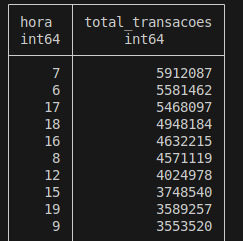
- Which hours have the most demand?
- Which weekdays have the most demand?
- Which consortiums have the most trips at rush hour?
- What is the spatial distribution of transactions in Rio?
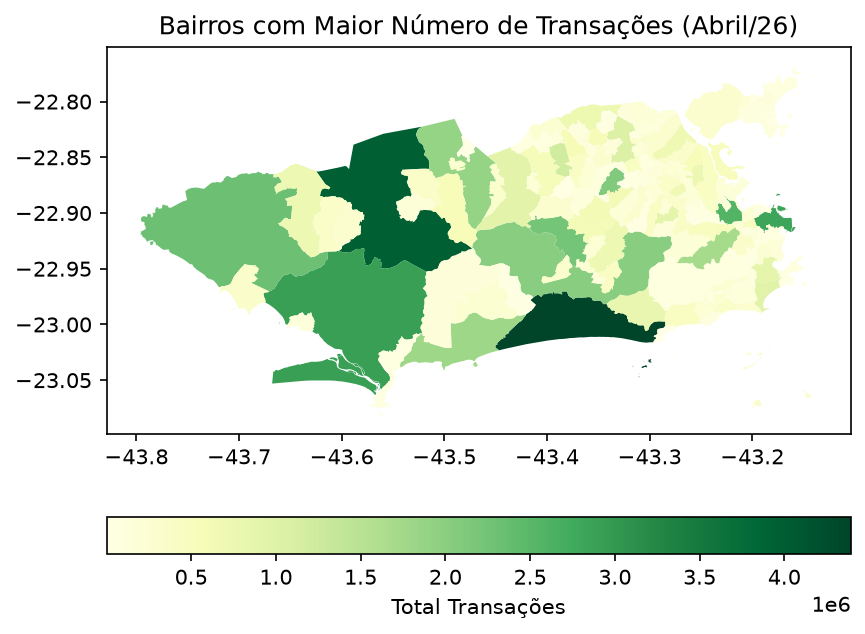
- Which neighborhood has the most transactions?
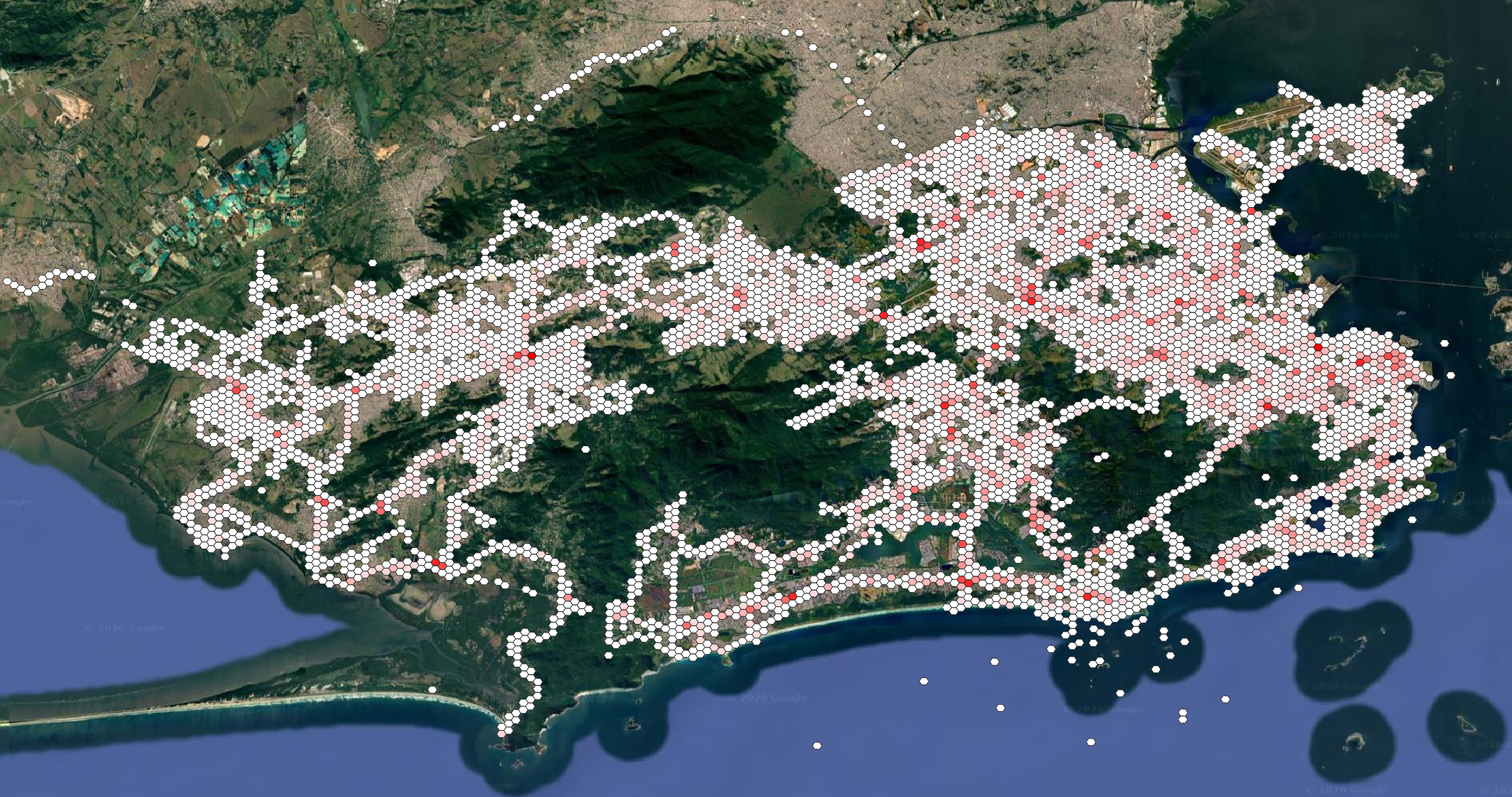
- Which places have the most transactions at rush hour? (H3 hexagon map)
Questions 1, 2 and 4 are one GROUP BY each:
import duckdb
from helper import get_connection

con = get_connection()

bucket_url = 'gs://dados_bilhetagem/medallion/gold/transacoes_abril/**/*.parquet'

con.sql(f'''
    SELECT COUNT(*) AS total_validations
    FROM read_parquet(
                    {'bucket_url'},
                    hive_partitioning = true);
    ''').df()
con.sql(f'''
    SELECT hora, COUNT(*) AS total
    FROM read_parquet({'bucket_url'},
                    hive_partitioning = true)
    GROUP BY hora
    ORDER BY total DESC;
    ''').df()
con.sql(f'''
        SELECT consorcio, COUNT(*) AS total
        FROM read_parquet({'bucket_url'},
                        hive_partitioning = true)
        WHERE is_rush_hour
        GROUP BY consorcio
        ORDER BY total DESC;
    ''').df()
Question 6 brings the neighborhood column into play:
con.sql(f'''
        SELECT neighborhood, COUNT(*) AS total
        FROM read_parquet({'bucket_url'},
                        hive_partitioning = true)
        GROUP BY neighborhood
        ORDER BY total DESC
        LIMIT 10;
    ''').df()
A tip that costs nothing: filter on data. It is the partition key, so DuckDB skips every folder outside the date range and reads only what the query needs. A query for one week does not touch the other three.
Question 7 is the one with a map. It counts rush hour transactions per H3 cell and turns each cell into a polygon:
con.sql(f'''
        SELECT
            COUNT(*) AS total_transactions,
            h3_cell,
            ST_AsWKB(
                H3_CELL_TO_BOUNDARY_WKT(h3_cell)::GEOMETRY
            ) AS geometry
        FROM read_parquet({'bucket_url'},
                        hive_partitioning = true)
        WHERE is_rush_hour IS TRUE
        GROUP BY h3_cell
        ORDER BY total_transactions DESC;
    ''').df()
Load the result in QGIS or plot it with GeoPandas and you get hexagons colored by demand.
Sources & Inspiration
The session was part of the FTL Brasil SpaceTech Bootcamp 2026. The references I shared with the students:
- Medallion Architecture (Databricks)
- Data Warehouse vs Data Lake vs Data Mart (AWS)
- Reverse ETL vs ETL vs ELT (Zuar)
- The Complete Modern GIS Roadmap (Matt Forrest)
- H3: Uber’s Hexagonal Hierarchical Spatial Index
- Spatial Data Management with DuckDB (YouTube)
Rodrigo Brust · rodreras